
Free repair job sheet template
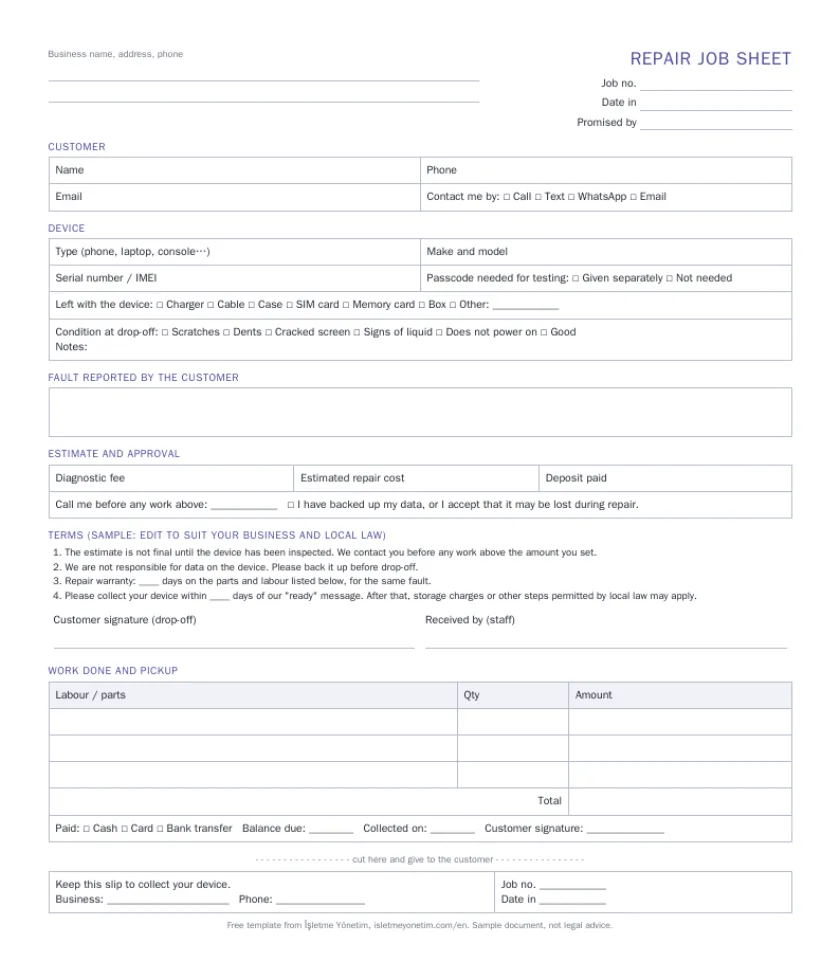
A one-page device intake form for phone, computer and electronics repair: customer, device, accessories, condition, estimate with an approval limit, sample terms, signatures and a tear-off slip for the customer.
No sign-up · free to use and edit in your shop
What is on the sheet, and why
Customer
Name, phone, email and how they want to be contacted, so the "ready" message reaches them the first time.
Device
Type, make and model, and the serial number or IMEI. The serial number is what proves later that the device you return is the one you received.
Left with the device
Charger, cable, case, SIM and memory card, box. Ticking these at the counter ends the "I left my charger with you" argument.
Condition at drop-off
Scratches, dents, cracked screen, signs of liquid, does not power on. Write it down while the customer is still there.
Fault in the customer's words
What they say is wrong, not your diagnosis. Your findings go in "work done" later.
Estimate and approval limit
Diagnostic fee, estimated cost, deposit, and the amount above which you must call before continuing.
Data and passcode
A tick that the customer backed up their data. The passcode is not written on the sheet; take it separately if testing needs it.
Sample terms and signatures
Four short sample terms to adapt, the customer's signature at drop-off, and a pickup section with parts, labour, payment and a second signature.
Tear-off slip
The customer keeps the bottom strip with the job number and your phone number and brings it back to collect the device.
How to use it at the counter
- Number your sheets in order (or use the date plus a counter) and write the job number in both places.
- Fill in the device and condition with the customer watching, and switch the device on if it powers on.
- Agree the approval limit out loud, then both sign.
- Tear off the slip and hand it over. Keep the sheet with the device.
- At pickup, fill in the work done and the payment, and get the second signature.
The same sheet, filled in for you
In İşletme Yönetim every job is a repair ticket: the job number is created for you, the customer's earlier devices are one tap away, parts come off stock, and the sheet prints with a QR code the customer scans to check progress. Free up to 250 records.
Questions
Is the job sheet template really free?
Yes. Download the PDF or Word file, or print it straight from the browser. No sign-up and no email address needed.
Can I add my logo and change the terms?
Yes. The Word file is editable: put your logo and details at the top and rewrite the sample terms. The PDF has a blank box for a stamp or a handwritten business name.
Are the sample terms legally valid where I am?
We are a software company, not lawyers. Rules on uncollected goods, deposits and repair warranties differ by country and state. Use the sample terms as a starting point and check them against your local consumer law.
Should I write the customer's passcode on the sheet?
Better not. A paper sheet is seen by several people. The template only asks whether a passcode is needed; take it separately and delete it once the job is done.
What is the difference between a job sheet and a repair ticket?
Same idea, different medium. A repair ticket is the digital version: the app fills in the job number, keeps the history of each device and prints the sheet for you.
Try it on your own work
Free up to 250 records with every feature, no credit card and no time limit. Not sure it fits? Ask Yaver, our assistant, right here on this page.
Related: Repair shop software Pricing
